
For several weeks now, I have been testing SerpWatch more intensively and documenting how reliably it actually updates rankings.
By now, a rather unusual picture has emerged.
At first, my keywords were not updated at all for an extended period of time. Then, suddenly, all keywords were shown at position 100 or outside the Top 100. After that, individual updates started appearing again – but not consistently across all keywords and not every day.
Now there is another issue: SerpWatch is showing more Keyword Checks used in my account than my monthly quota includes.
And that’s where things get interesting.
4,650 Credits Purchased, 4,861 Used
My available monthly quota is 4,650 Keyword Checks.
In the main SerpWatch window, the corresponding usage is displayed with an orange progress bar. The value shown there is 2,495.
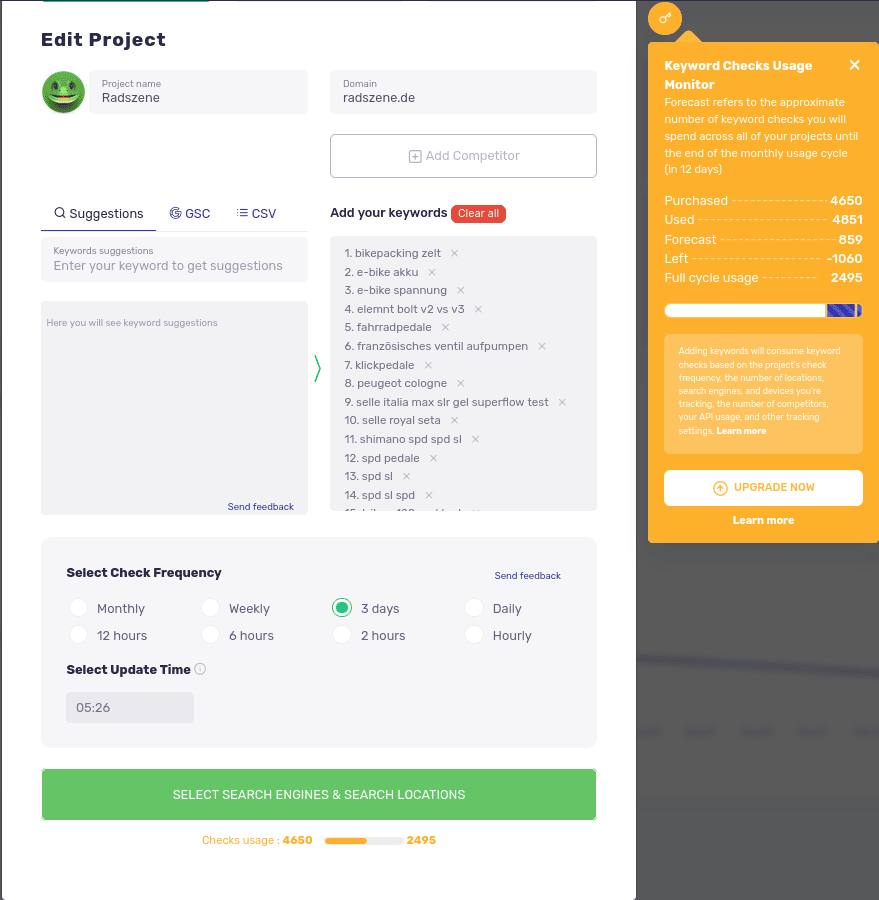
Things get even more interesting when opening the Keyword Checks Usage Monitor.
It currently shows:
- Purchased: 4,650
- Used: 4,861
- Forecast: 859
- Left: −1,060
- Full Cycle Usage: 2,495
This raises a number of questions.
On the one hand, there are 4,650 purchased Keyword Checks. On the other hand, the account already shows 4,861 checks used. The displayed usage is therefore already 211 checks above the available quota.
At the same time, the interface shows a Full Cycle Usage of only 2,495.
At least at first glance, it is not clear how exactly SerpWatch calculates these different usage figures.
The Project Configuration Is Not Above the Quota
What is even more important to me, however, is how the project settings are displayed.
I have not configured more Keyword Checks than my account or plan provides. SerpWatch has a corresponding status indicator for exactly this situation.
The indicator is orange.
It is not red.
This is relevant because, based on my experience using SerpWatch, the red indicator signals that more Keyword Checks have been scheduled than the available quota can cover.
That is not the case here.
The project settings therefore do not give the impression that I have exceeded my quota by configuring too many keywords or checks.
This makes it even harder for me to understand how a usage figure of 4,861 Keyword Checks can subsequently be generated.
Project Usage Is Now Being Restricted
This is also not simply a friendly suggestion that I should consider purchasing a larger plan.
The project can no longer be managed as usual.
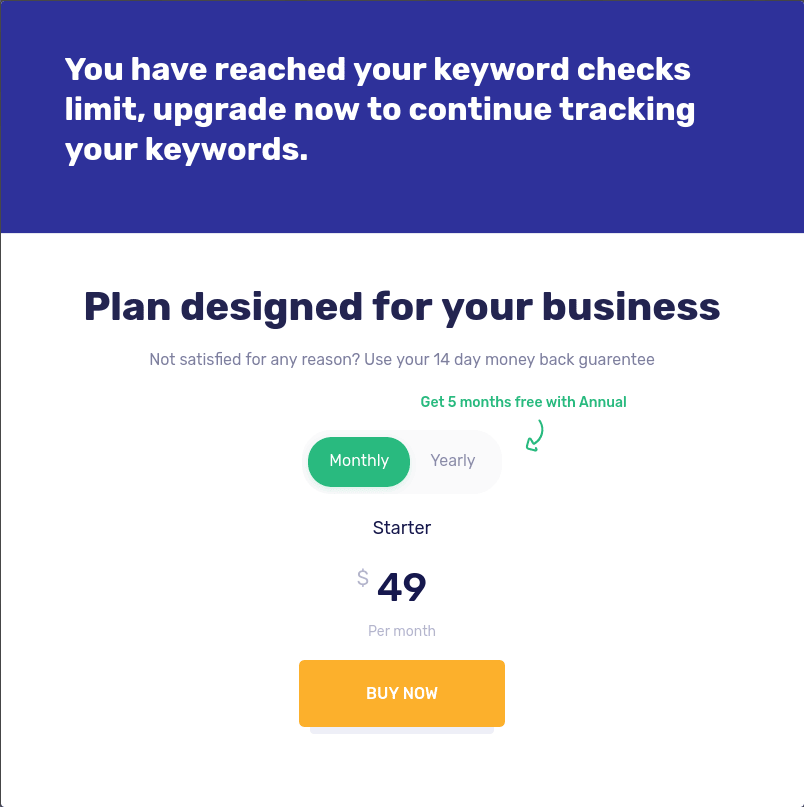
When I try to make changes to the project or delete it, I am asked to change my subscription plan.
This turns what might otherwise be an indication of potentially exceeded usage into a concrete restriction on how I can use my account.
And this is where the key question arises:
Why is changing my subscription plan required if the project configuration itself is within the available quota?
This Fits the Pattern I Have Observed So Far
Viewed in isolation, the current credit display might still be dismissed as a technical detail.
In the context of SerpWatch’s behavior over the past few weeks, however, it looks quite different.
This is the sequence I have observed:
- For an extended period of time, the rankings were essentially not updated.
- The keywords were then suddenly shown consistently at position 100 or outside the Top 100.
- Individual keywords subsequently started being updated again on individual days.
- The account now shows 4,861 Keyword Checks used despite having 4,650 purchased checks.
- At the same time, project management is being restricted and I am asked to change my subscription plan.
I cannot reliably determine from this alone what is technically happening behind the scenes.
But I can say that, at this point, the different figures displayed in the interface and the actual behavior of the system do not make sense to me as a coherent picture.
Particularly Questionable: The Upgrade Offer
And this is also where the repeated prompts to switch to a paid monthly subscription become particularly problematic for me.
I have been using SerpWatch for years based on a Lifetime Deal.
When the application repeatedly encourages me to switch to a monthly paid plan while my existing usage is simultaneously being restricted because of an allegedly exceeded quota, I expect a clear explanation first.
This is not about SerpWatch offering me a different product or plan.
There is nothing wrong with displaying an upgrade offer.
The problem begins when the reason for the restriction itself is not clear.
If an account is being operated within its intended project configuration, it should be possible to understand how the displayed usage was generated.
What I Would Like SerpWatch to Explain
At this point, I therefore have a few very specific questions:
- How are the 4,861 Used Keyword Checks calculated?
- Why is this figure contrasted with only 2,495 Full Cycle Usage?
- Which operations caused usage to exceed the purchased 4,650 Checks?
- Why is the project configuration still shown as orange rather than red?
- Why can I no longer manage the affected project as usual without changing my subscription plan?
- And why am I being encouraged to switch to a paid monthly plan in this situation?
There may well be a technical explanation for all of these points.
That is exactly what I would like to see.
After several weeks of unusual or incomplete ranking updates, a suddenly displayed usage figure that exceeds the available quota is not simply a normal usage statistic to me.
It is an inconsistency that should be explained.