
Anyone who wants to monitor their Google rankings regularly will sooner or later come across SerpWatch. The tool has been on the market for many years and, in addition to ranking tracking itself, offers numerous reports and features for managing projects.
The SERP Checker takes a different approach. The focus is not on creating the most comprehensive project possible, but on the individual SERP query. Keywords can be configured independently of one another with different regions, devices, and other parameters.
But which approach makes more sense for which use case?
This comparison looks at SerpWatch and the SERP Checker not only in terms of feature lists and prices. Other questions are equally important: How are keywords organized? How flexibly can individual queries be configured? How deep can a SERP be checked? How transparent are updates? And how many actual queries do you get for the respective quota?
In short: SerpWatch and the SERP Checker take different approaches. SerpWatch organizes ranking tracking through projects. The SERP Checker puts the individual SERP query at the center.
SerpWatch and SERP Checker Compared Directly
| SerpWatch | SERP Checker | |
|---|---|---|
| Basic principle | Project-oriented rank tracking | Query-oriented SERP tracking |
| Keywords | Project-based | Individually configured per row |
| Region | Through project configuration | Configurable per keyword |
| Device | Through project configuration | Configurable per keyword |
| SERP depth | Configurable for the entire project | Configurable per keyword |
| Competitors | Can be integrated into projects | Controllable per keyword |
| Ranking history | Available | 30-day history per keyword |
| Competitor comparison | Available | At keyword level |
| Search volume | Indicator available | Planned |
| Update status | Status indicators such as “Checking” / “Updating” | Actual update timestamp |
| Client Management | Depending on plan | No separate agency product |
| White Label | Depending on plan | – |
| Server location | – | Germany |
| Registration | Automated | Account setup by email |
| Billing | Keyword-check model | Check-based model |
First Look: SerpWatch Offers More Keyword Checks
At first glance, SerpWatch appears to be significantly ahead of the SERP Checker in terms of available volume.
And that is true – at least if you look exclusively at the number of keyword checks.
For example, SerpWatch states that it includes 7,500 keyword checks per month. The SERP Checker offers 450 checks per month, or 45,000 guaranteed positions at a crawl depth of 100, in the comparable Advanced plan.
However, the comparison only makes sense if you consider how each unit is defined.
SerpWatch explicitly calls its billing unit a keyword check. The number of possible checks depends on the selected crawl depth.
With a crawl depth of 10, 7,500 keyword checks result in:
7,500 × 10 = 75,000 positions
If the crawl depth is increased to 100, the corresponding quota is reduced to 750 keyword checks:
750 × 100 = 75,000 positions
With the SERP Checker, the Advanced plan provides 450 checks at a crawl depth of 100, resulting in 45,000 guaranteed positions.
The Volumes Compared Directly
| SerpWatch | SERP Checker | |
|---|---|---|
| Price without annual commitment | $49/month | €29/month |
| Price with annual commitment | $29/month | €27/month |
| Keyword checks / checks at crawl depth 10 | 7,500 keyword checks | 4,500 checks |
| Keyword checks / checks at crawl depth 100 | 750 keyword checks | 450 checks |
| Guaranteed positions at crawl depth 100 | 75,000 | 45,000 |
So at first, the matter is clear:
SerpWatch leads in terms of raw volume.
And that is exactly why it would be too simplistic to market the SERP Checker merely by comparing the number of available checks or positions.
The interesting comparison only begins after that.
Because with a SERP tracker, it is not only important how many positions can theoretically be checked.
It is equally important how you can control those queries, how transparent the results are, and how reliably updates are performed.
Project or Individual SERP Query?
The fundamental difference between SerpWatch and the SERP Checker lies in how queries are organized.
With SerpWatch, the project is at the center.
With the SERP Checker, the individual row or SERP query is at the center.
This has practical consequences.
With the SERP Checker, individual keywords can be configured independently of one another. For example, one keyword can be checked for Germany on desktop, while another keyword is simultaneously checked for Austria on mobile.
An example:
| Keyword | Region | Device |
|---|---|---|
| Keyword A | Germany | Desktop |
| Keyword B | Germany | Mobile |
| Keyword C | Austria | Desktop |
| Keyword D | Switzerland | Mobile |
All of these queries can still be processed together in a single daily job.
This means that different settings do not necessarily have to be represented by separate projects.
Why Per-Keyword Configuration Makes a Difference
With a project-oriented rank tracker, it makes sense to create a website and define keywords, regions, devices, and competitors for that project.
This works well as long as all keywords are supposed to be monitored with the same parameters.
In practice, however, that is not always the case.
Perhaps one keyword should be monitored on desktop and another on mobile. Perhaps Germany is relevant for one keyword while Austria is relevant for another. And perhaps competitors should be included for some keywords but not for others.
With the SERP Checker, these settings can be configured directly for the individual row.
This is not a question of which product can do “more” or “less”. It is a difference in the structure of the tracking system.
SerpWatch thinks more in terms of projects. The SERP Checker thinks more in terms of individual SERP queries.
A Separate Domain Is Not Necessarily Required
With the SERP Checker, you do not necessarily have to enter your own domain as a reference.
A single row can also be used to monitor the rankings of another domain – for example, a competitor’s domain.
This is not technically unique. SerpWatch also allows you to monitor a competitor domain. The difference is rather in how quickly and easily such a query can be created and assigned individual parameters.
With the SERP Checker, this is done directly at the row level.
SERP Depth: Top 10, Top 30, or Top 100?
Not every ranking-tracking scenario requires the same depth.
If you only want to know whether a website appears among the first ten results for a keyword, there is no need to retrieve the first 100 positions.
For other applications, however, it can be useful to capture rankings outside the Top 10.
The SERP Checker therefore allows queries down to position 100.
SerpWatch also offers the option to define the crawl depth, but this is configured at project level.
SerpWatch: Comprehensive Project Overview
SerpWatch provides a comprehensive project overview with various metrics.
These include, among others:
- Average Position
- Keywords Moved Up
- Keywords Without Change
- Keywords Moved Down
- Keywords in Top 3
- Keywords in Top 10
- Keywords in Top 30
- Keywords in Top 100
Historical charts and other analyses of the collected ranking data are also available.
One feature that I actually find useful is the search volume indicator. It does not provide a fixed search volume figure, but it gives you an indication of the general order of magnitude and can therefore help assess a keyword list.
The Google updates displayed in the ranking chart are also interesting. Clicking on a corresponding entry displays information about the respective update.
Other metrics are less clear-cut. One example is the “Project Monthly Value” displayed by SerpWatch. It is intended to represent a monthly value for the project. How meaningful such an automatically calculated metric actually is for a specific project is something each user has to decide for themselves.
An Observation About the Development of SerpWatch
SerpWatch has always been rather slow in my own experience. I don’t mind a slow interface if current and reliable data is available afterward.
Following Google’s changes regarding the available SERP depth, I initially observed that SerpWatch only tracked up to position 10. During that period, the interface was noticeably faster and the results were reliably available.
Later, SerpWatch introduced a setting that once again allowed the crawl depth to be configured.
My personal observation since then: Over time, the interface became increasingly slower again. Later, I also encountered problems with the updating of my keywords.
It is important to make a distinction here:
This is a chronological observation from my own use. It does not mean that the configurable crawl depth was the cause of the slower interface or the later update problems.
Updating: When “Checking” Does Not Mean That a Current Result Is Available
This is currently one of the most important differences for me.
I have been using SerpWatch for around six years. At the time of this comparison, one of my projects contains 16 keywords.
Of these 16 keywords, only one has actually been updated over the past several weeks. The other 15 have not been updated at all. Nevertheless, they continue to display a status such as “Checking”.
SerpWatch project with 16 keywords, 15 of which have not been updated for an extended period
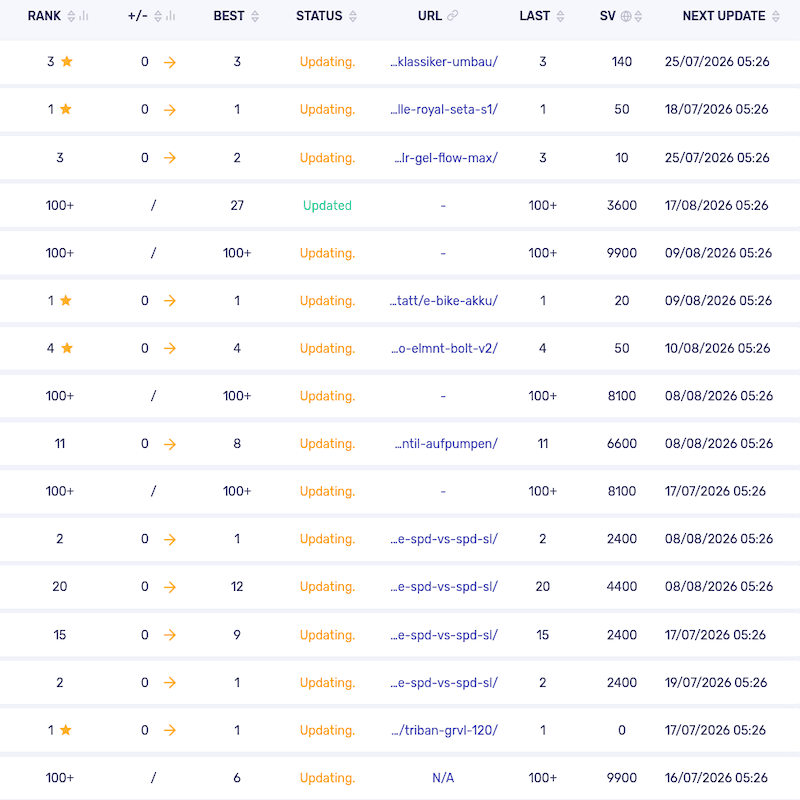
Such a status can generally mean that a check is scheduled or that a process has been initiated. However, it does not document when the keyword was actually updated most recently.
I consider this distinction important for a rank tracker.
“No incidents reported” – Yet Updates Still Fail to Occur
SerpWatch has its own status overview. It may, for example, display “No incidents reported.”
SerpWatch status page showing “No incidents reported”
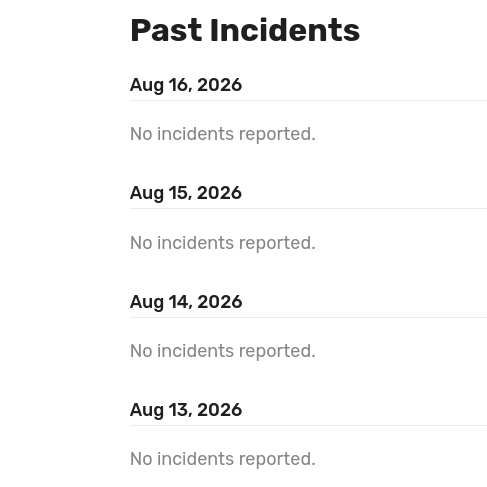
At the same time, my own projects have shown a very different picture over an extended period.
In my projects, only a very small number of keywords have actually been updated over several weeks. The vast majority remained without a new ranking result.
SerpWatch projects with updates not being completed
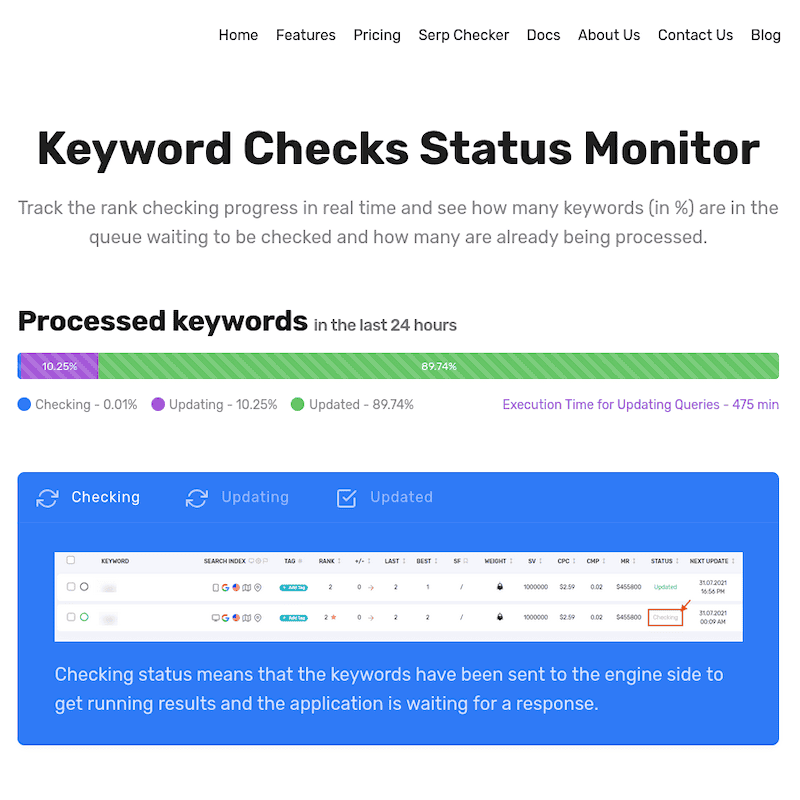
The status bar gives the impression that a large number of keywords have been processed and that the job should be completed within the indicated time.
For weeks, however, I have seen a different picture. Regardless of whether it says 500 or 1,000 minutes until the update: the fact is that in my case, no new SERP results are being delivered.
Again, this needs to be qualified: “No incidents reported” and status bars do not necessarily mean that an individual user cannot experience a problem. The status page merely documents that SerpWatch itself is not reporting a corresponding general incident at that time.
As a user, the decisive question for me remains:
Have my keywords actually been updated?
An Actual Update Timestamp Instead of a Status
The SERP Checker answers this question differently.
For every keyword, the actual time of the update is documented.
Instead of a status such as “Checking”, “Updating”, or “Preparing”, there is a specific timestamp.
SERP Checker showing update timestamp
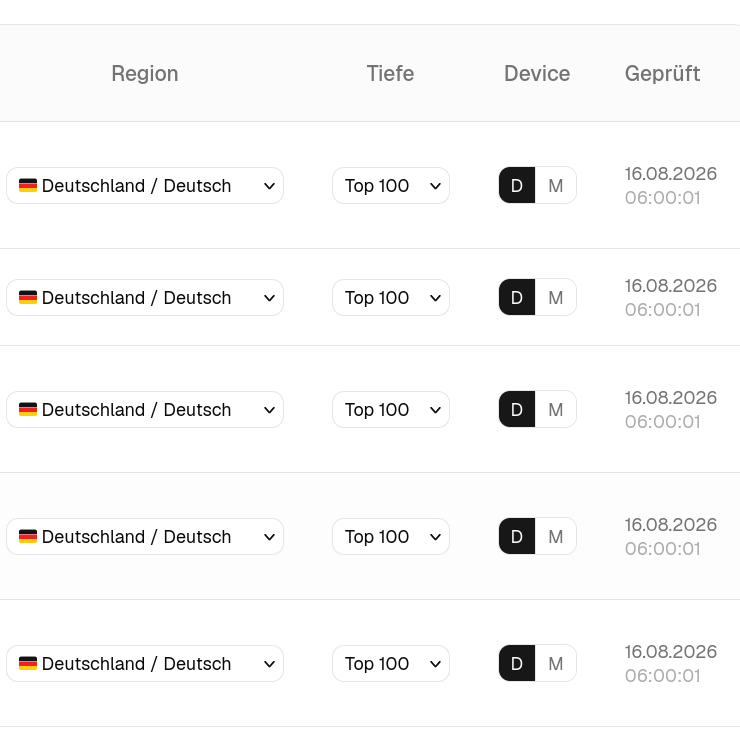
For me, this is a significant difference.
A status describes a state.
A timestamp documents a point in time.
And that is precisely the information that matters for ranking tracking: When was this keyword actually checked?
The SERP Checker Is Fast – But Speed Is Not the Decisive Point
In my experience so far, the SERP Checker’s daily job is delivered very quickly. As far as I can tell, it has never taken more than a few seconds for the complete job to become available.
That is convenient, but it is not the real point.
I am relatively relaxed about the speed of such systems.
If a SERP query takes 15 seconds, that is perfectly acceptable to me.
What matters is:
When the result is there, it must be current.
A fast status without a current result is worth less than a slower query whose result is actually reliable and available.
Regional Settings: Google.de, Google.com, and the Actual Target
Another difference concerns how regional searches are defined.
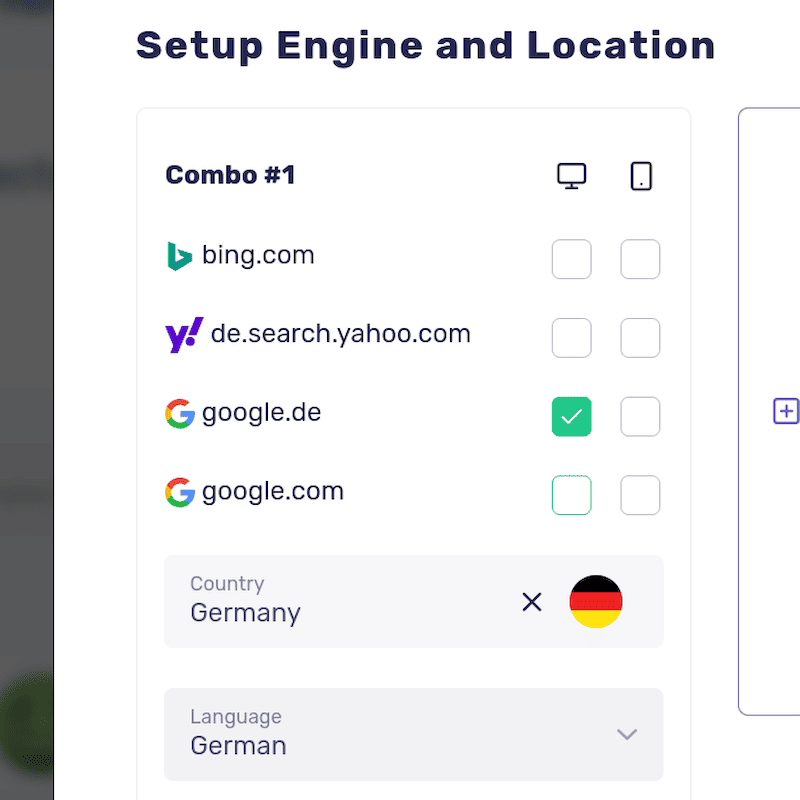
With SerpWatch, you can select the Google domain and country, among other things. This allows combinations such as:
- Google.de + Germany
- Google.com + Germany
Both combinations can produce different results.
For me, however, it was never completely transparent what exact search situation such a combination represents.
The SERP Checker takes a different approach.
Here, the target region is defined directly, for example:
- Germany
- Austria
- Switzerland
- France
This makes the regional focus of the query more immediately understandable.
SerpWatch selection of Google domain and country
SERP Checker selection of region
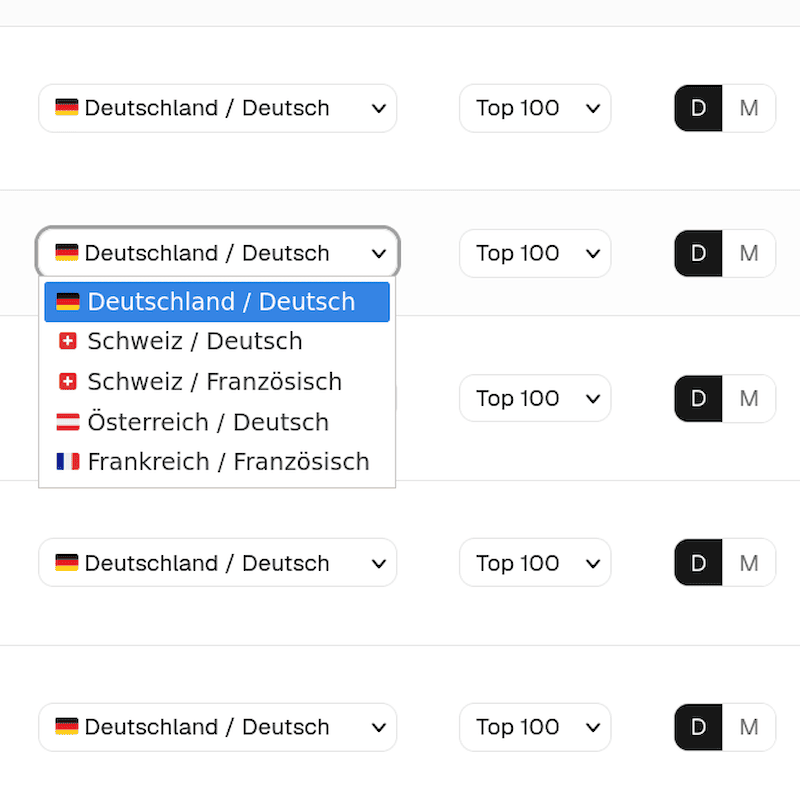
This clarity is particularly important for regional ranking tracking. A ranking in Germany is not the same as a ranking in Austria, where German is also spoken. And a query across different Google domains should be understandable to the user.
With SerpWatch, there is room for interpretation that simply isn’t necessary.
Search Engines: Google, Bing, and Yahoo
One area where SerpWatch has a clear advantage is the choice of search engines.
In addition to Google, SerpWatch can also monitor Bing and Yahoo. The SERP Checker, on the other hand, currently focuses exclusively on Google.
For users who want to monitor multiple search engines in parallel, SerpWatch is therefore more flexible.
For traditional SEO work in Germany, however, Google is the decisive search engine. Google has by far the largest market share here. The SERP Checker’s focus on Google therefore corresponds to the use case for which the tool was designed.
If you specifically want to monitor rankings on Bing or Yahoo, however, the SERP Checker currently does not offer that option.
Competitors: More Options with SerpWatch, but Also a Higher Query Volume
When it comes to the number of competitors, SerpWatch has a clear advantage. You can add significantly more competitors to a project. With the SERP Checker, on the other hand, a maximum of two competitors per keyword is provided.
This is a deliberate, practical limitation. For most applications, comparing two competitors is sufficient. If you regularly want to compare a larger number of domains, however, SerpWatch offers significantly more options.
At the same time, the number of competitors also increases the number of keyword checks.
Let’s take a simple example:
- 10 of your own keywords
- 9 competitors
- Crawl depth 100
This means that for each keyword, a total of 10 domains need to be considered. At a crawl depth of 100, that corresponds to:
10 keywords × 10 domains × 10 SERP pages = 1,000 keyword checks
And those 1,000 keyword checks are actually consumed.
You can already see this in the project preview in SerpWatch.
With the SerpWatch plan offering 7,500 keyword checks, such a project would therefore use up the quota after just the eighth daily run.
This illustrates why the nominally high number of 7,500 keyword checks must always be considered in the context of the actual project configuration.
Individual Competitor Selection
There is another point that can be relevant in day-to-day work.
With SerpWatch, competitors are initially added at project level and then assigned to or removed from individual keywords.
In a larger project, this can quickly become time-consuming. In my experience, competitors that were previously removed can be added back to keyword queries after certain changes are made and the project is saved again.
This means that the individual assignment then has to be adjusted again.
This is particularly inconvenient when you deliberately want to monitor competitors only for certain keywords – for example, to improve clarity or limit the query volume.
A Different Understanding of Updates
Another fundamental difference between the two systems becomes apparent here.
SerpWatch allows you to configure the timing of a project’s updates. Depending on the settings, you can specify certain intervals or a specific time for checking. A check can also be manually triggered or restarted.
This offers a great deal of flexibility.
However, it also means that users who request updates very frequently can consume their available keyword-check quota accordingly quickly.
The SERP Checker deliberately follows a different model.
Here, there is one central daily job that processes all users’ queries once a day. Updates are therefore not performed individually every few hours or after every time a project is saved again.
This is less flexible – and that is intentional.
The SERP Checker is not designed to encourage or enable users to burn through their quota within a very short period through repeated manual or scheduled queries.
Instead, there is a fixed daily update time. The actual time at which each keyword is subsequently updated is documented.
This makes for an interesting distinction: SerpWatch offers more control over when and how often a project is checked. The SERP Checker, by contrast, relies on a centrally controlled daily run.
What Do 7,500 Checks Actually Mean?
SerpWatch advertises, for example, a quota of 7,500 checks per month in its smallest plan.
The number sounds large at first.
However, what matters is what a single check actually covers and which additional parameters affect consumption.
Let’s take a simplified example with:
- 20 keywords
- 2 competitors
Even this already results in numerous individual ranking queries.
If you also want to check deeper than the Top 10, the amount of data required increases accordingly.
With a sample configuration, you can therefore very quickly reach a point where a quota of 7,500 checks per month no longer seems particularly large.
That is why when comparing rank-tracking prices, you should not only ask:
“How many checks are included?”
You should also ask:
“What is actually captured by one check?”
The Key Difference: Large Keyword Volume or Targeted Queries?
The different quotas become easier to understand when you consider how you actually want to use a SERP tracker.
If you want to collect and monitor a very large number of keywords in a project over many years, SerpWatch can be an interesting option. The larger number of keyword checks makes it possible to keep many keywords in the system permanently and monitor them regularly at a comparatively low cost. The ability to include numerous competitors also supports this approach.
The SERP Checker has a different focus.
The largest plan currently includes 30 checks per day. These can be distributed selectively across individual keywords: Some queries can run without competitors, while others can include one or two competitors.
This means that 30 daily queries can already provide a fairly comprehensive daily data set.
The question is therefore less about which quota is larger on paper and more about the intended use case:
Do I want to keep as many keywords as possible in the system permanently and occasionally review their development? Then SerpWatch’s larger quota is interesting.
Or do I want to work with a limited number of carefully selected queries every day and configure those queries individually? Then the SERP Checker’s model is interesting.
Both approaches have their justification. The important thing is which one fits your requirements.
Search Volume: One of the More Useful Additional Data Points
One feature I would explicitly highlight as a positive aspect of SerpWatch is its search volume indicator.
Although it does not provide an exact search volume figure, it can quickly show whether a keyword is likely to receive any significant amount of search traffic at all.
This is particularly useful with larger keyword lists.
For example, you can see:
- There appears to be relevant search interest here.
- Search interest is rather low here.
- This keyword is probably more interesting than that one.
That is a useful addition to the pure ranking data.
The SERP Checker currently takes a different approach.
The keyword detail page focuses primarily on the actual ranking data and its development.
The detail page may be expanded with additional analyses in the future. For now, however, the priority is the foundation: reliable and transparent SERP data.
The SERP Checker’s 30-Day History
The SERP Checker is not limited to the current ranking position either.
A 30-day history is available for each keyword.
This allows you to see how your own ranking and the rankings of monitored competitors have developed.
The SERP Checker is therefore not simply a tool that performs a Google search once.
It combines individual SERP queries with a historical view of their development.
Client Management and White Label
This is an area where you need to look closely at the different plans.
The SERP Checker is currently not a separate agency product. It is designed as a single-user product for users who want to monitor their own rankings.
SerpWatch, on the other hand, offers features for agencies and client management in its higher-tier plans.
I personally use an older SerpWatch plan that includes corresponding client features.
The client management itself basically worked. A client could receive their own login and view the relevant results.
However, I encountered practical problems when setting up a custom white-label domain.
The setup initially required adding a CNAME record in the domain management system. An individual SSL/TLS certificate was also required for the HTTPS connection.
The procedure described by SerpWatch did not work as documented in my infrastructure. In the end, I had to purchase a certificate and send the required components to SerpWatch support. The support team then implemented the configuration, after which it worked.
Support communication regarding the White Label setup
I don’t use Cloudflare. I followed your instructions: grabbed the CSR, added the CNAME record, created the certificate for the subdomain and put the CRT into the still open box for SSL.
The support team then told me:
Can you send us your certificate including the certificate and key? I will try to install it on our server.
The support team therefore asked me to provide the certificate including the private key so that it could be installed on the SerpWatch server.
After I provided the required files, support eventually confirmed:
“We have resolved your SSL issue, please check and let us know if you have any other questions and concerns.”
The white-label domain was then working.
SerpWatch and Support
Another change I have observed over the years concerns support.
There used to be a chat window within the tracker through which you could contact support directly. The request was ultimately handled via email.
This option is no longer available in the same form.
For support requests, you now have to switch to SerpWatch’s main website, which is also where new customer acquisition takes place, and contact them there. No contact or support channel is provided directly within the tool’s subdomain.
This is particularly relevant to me because I have recently contacted support several times about the lack of updates to my keywords.
What SerpWatch Does Well
A fair comparison should also mention SerpWatch’s strengths.
From my perspective, these include in particular:
- the comprehensive project overview
- historical ranking charts
- the search volume indicator
- Google update markers
- competitor comparisons
- various ranking analyses
- client features for agencies on the corresponding plans
SerpWatch therefore provides a comprehensive interface for managing and analyzing ranking data.
The key question, however, is not simply how many analyses an interface provides.
The key question is:
How reliable is the data on which these analyses are based?
Who Could SerpWatch Be Right For?
SerpWatch can be particularly interesting if you want to monitor a very large number of keywords on a permanent basis and the project-oriented approach fits your workflow.
For example, anyone who wants to monitor a large number of keywords while using a relatively low crawl depth can get an interesting price-to-performance ratio from the appropriate SerpWatch plan.
The additional analyses and, on the relevant plans, client features can also be useful for agencies.
However, you should carefully check how many checks your specific use case actually requires.
And you should be aware that a rank tracker should still be monitored regularly even when the interface indicates that an automated tracking process is running.
Who Is the SERP Checker Interesting For?
The SERP Checker is particularly interesting for users who want to configure their SERP queries individually and independently of one another.
This includes users who want to:
- configure individual keywords independently of one another
- monitor different regions within a single daily job
- use desktop and mobile independently of one another
- define the crawl depth per keyword
- monitor competitors only for selected keywords
- see the actual time at which a query was updated
- work with a focused selection of keywords every day
The SERP Checker does not attempt to put as many features as possible into a single interface.
It starts with a different question:
What does a SERP tracker actually need to do reliably?
The initial answer is very simple:
It needs to actually retrieve the SERPs and document the results in a transparent way.
SerpWatch or SERP Checker?
Ultimately, the decision depends on your own use case.
If you are looking for project-oriented ranking management with extensive analyses and additional features, SerpWatch may be interesting.
If, on the other hand, you value individually configurable queries, precise regional targeting, freely selectable SERP depth, and an actual update timestamp, you should take a closer look at the SERP Checker.
It is not about which product lists more features on its website.
It is about which product better fits the way you work.
The Difference in One Sentence
SerpWatch organizes rank tracking through projects. The SERP Checker organizes rank tracking through individual SERP queries.
And when it comes to updates, the difference is even simpler:
Not “Checking”, but an actual timestamp.
Conclusion
SerpWatch and the SERP Checker are not identical products with different prices.
They take different approaches.
SerpWatch is project-oriented and offers numerous analyses around the collected ranking data. The SERP Checker, by contrast, puts the individual SERP query at the center and allows each keyword to be configured independently.
SerpWatch can be interesting for users who want to manage a large number of keywords and use a comprehensive project structure.
The SERP Checker is aimed more at users who care about exactly what is queried, when it was queried, and which settings apply to the individual keyword.
For me personally, after several years of using SerpWatch, one thing has become particularly important:
A rank tracker does not have to be particularly fast, nor does it need to have an enormous number of features. The ranking data has to be reliable and transparently up to date.
That is exactly what the SERP Checker is designed around.
Link to the interactive dashboard preview: Dashboard
Frequently Asked Questions About SerpWatch and SERP Checker
Is the SERP Checker an alternative to SerpWatch?
Yes. The SERP Checker is an alternative for users who want to monitor SERP rankings individually per keyword and place particular emphasis on transparent updates and regional settings.
What is the most important difference between SerpWatch and the SERP Checker?
SerpWatch organizes rank tracking through projects. With the SERP Checker, each individual SERP query can be configured independently.
Can I use different regions for different keywords with the SERP Checker?
Yes. The region and other parameters can be configured independently for each individual row.
Can the SERP Checker check rankings down to position 100?
Yes. The crawl depth can be set to position 100.
Can I combine desktop and mobile for different keywords?
Yes. The device can be selected independently for individual keywords.
Does the SERP Checker provide ranking history?
Yes. A 30-day history is available for individual keywords and can also show the development of monitored competitors.
Does the SERP Checker show the actual update time?
Yes. Each update is documented with a specific timestamp.
Is SerpWatch better or worse than the SERP Checker?
There is no general answer to that. Both products take different approaches and may be suitable for different requirements.
Who might find SerpWatch the better choice?
SerpWatch can be particularly interesting for users who want to manage many keywords through projects and need additional analyses and, depending on the plan, client-management features.
Who is the SERP Checker particularly suitable for?
The SERP Checker is particularly suitable for users who want to configure individual keywords independently and see exactly when their SERP data was actually updated.
Where is the SERP Checker’s data processed?
The SERP Checker is operated on servers in Germany.
How is the SERP Checker billed?
Current prices and query quotas: Pricing